
🔄 Repeating Transactions Guide
Automate recurring expenses and income. Set it once, and Hooldbudget creates transactions automatically each period.
What are Repeating Transactions?
Transactions that occur regularly - monthly rent, weekly groceries, bi-weekly salary. Instead of logging manually each time, create once and they repeat automatically.
Rent/Mortgage
Same amount, same day each month
Subscriptions
Netflix, Spotify, gym membership
Salary
Regular income on payday
Creating Repeating Transactions
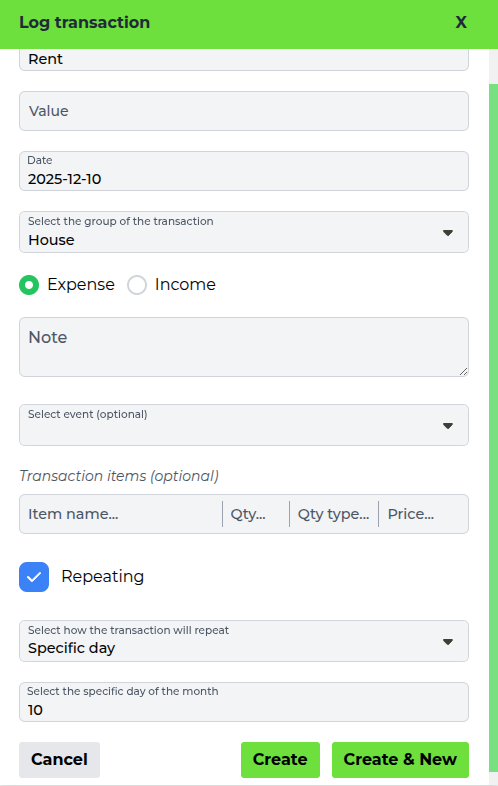
- Log a transaction normally
- Tick the "Repeating" checkbox
- Under "Select how the transaction will repeat"
choose:
- Specific day: Same day each month (e.g., 1st, 15th)
- Range: Every X days (e.g., every 30 days)
- Enter the day number or the number of days
- Click "Create"
From then on, each new period you create gets its copy of the transaction automatically.
Repeating Types
📅 Specific Day of Month
Transaction repeats on the same day each month.
Example: Rent on the 1st, salary on the 15th
🔢 Day Range
Transaction repeats every X days.
Example: Every 30 days, every 14 days (bi-weekly)
Managing Repeating Transactions
When you save a change to a repeating transaction, Hooldbudget asks "Which transactions do you want to take effect?" and gives you three choices:
- Only this: Change this one occurrence and leave the rest of the series alone
- Future transactions: Update this one and every later occurrence
- All transactions: Change every occurrence in the series, past ones included
💡 Tip: If a subscription price changes, choose "Future transactions" so your past periods keep showing what you actually paid at the time.
Common Use Cases
🏠 Fixed Bills
Rent, mortgage, insurance - same amount monthly
💳 Subscriptions
Streaming services, software, memberships
💰 Regular Income
Salary, pension, rental income
🔧 Maintenance
Car service, home maintenance on schedule
Automate Your Budget
Set up repeating transactions and save time every month.
Create Repeating TransactionNext Guide:
Collaboration Guide