
👥 Collaboration & Sharing Guide
Share virtual cards with family, partners, or roommates. Collaborate on budgets and track shared expenses together.
Why Share Budgets?
💑 Couples
Manage household expenses together. Both partners can log transactions and see the full picture.
👨👩👧👦 Families
Share family budget with spouse or older children. Teach financial responsibility.
🏠 Roommates
Track shared apartment expenses. Everyone can see who paid what.
✈️ Travel Groups
Share vacation budget with travel companions. Split expenses fairly.
How to Share a Virtual Card
- Go to Cards page
- Select the card you want to share in the card row
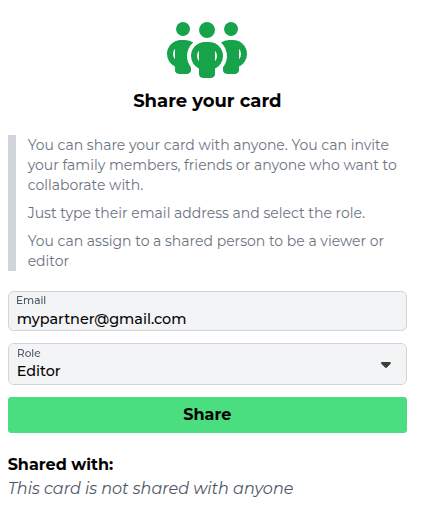
- Find the "Share your card" column
- Enter the email address of the person
- Choose their role (Editor or Viewer)
- Click "Share"
- They get an email letting them know the card was shared with them
User Roles
✏️ Editor
Full access to add, edit, and delete transactions and groups.
Can: Log transactions, create groups, modify budgets
Cannot: Delete the card or remove the owner
👁️ Viewer
Read-only access. Can see everything but cannot make changes.
Can: View all transactions, groups, and reports
Cannot: Add or modify anything
💡 Tip: Use Viewer role for accountability partners or financial advisors who should see but not change your budget.
Managing Shared Access
As the card owner, you can:
- See who has access: Everyone the card is shared with is listed under "Shared with", along with their role
- Remove access: The bin icon next to a person revokes their access immediately
- Change a role: Remove the person and share the card with them again using the other role
Sharing is per virtual card, so you decide exactly how much someone sees. A common couples setup is one shared household card plus a private card each - see the virtual cards guide.
Best Practices for Shared Budgets
- ✓ Set clear expectations: Discuss who logs what before sharing
- ✓ Use descriptive names: Help others understand transactions
- ✓ Review together: Check budget weekly as a team
- ✓ Communicate changes: Let others know if you modify budgets
Next Guide:
Shopping Lists Guide