
📅 Periods & Budgeting Guide
Periods help you organize your budget into manageable time frames. Plan ahead and track your progress over time.
What is a Period?
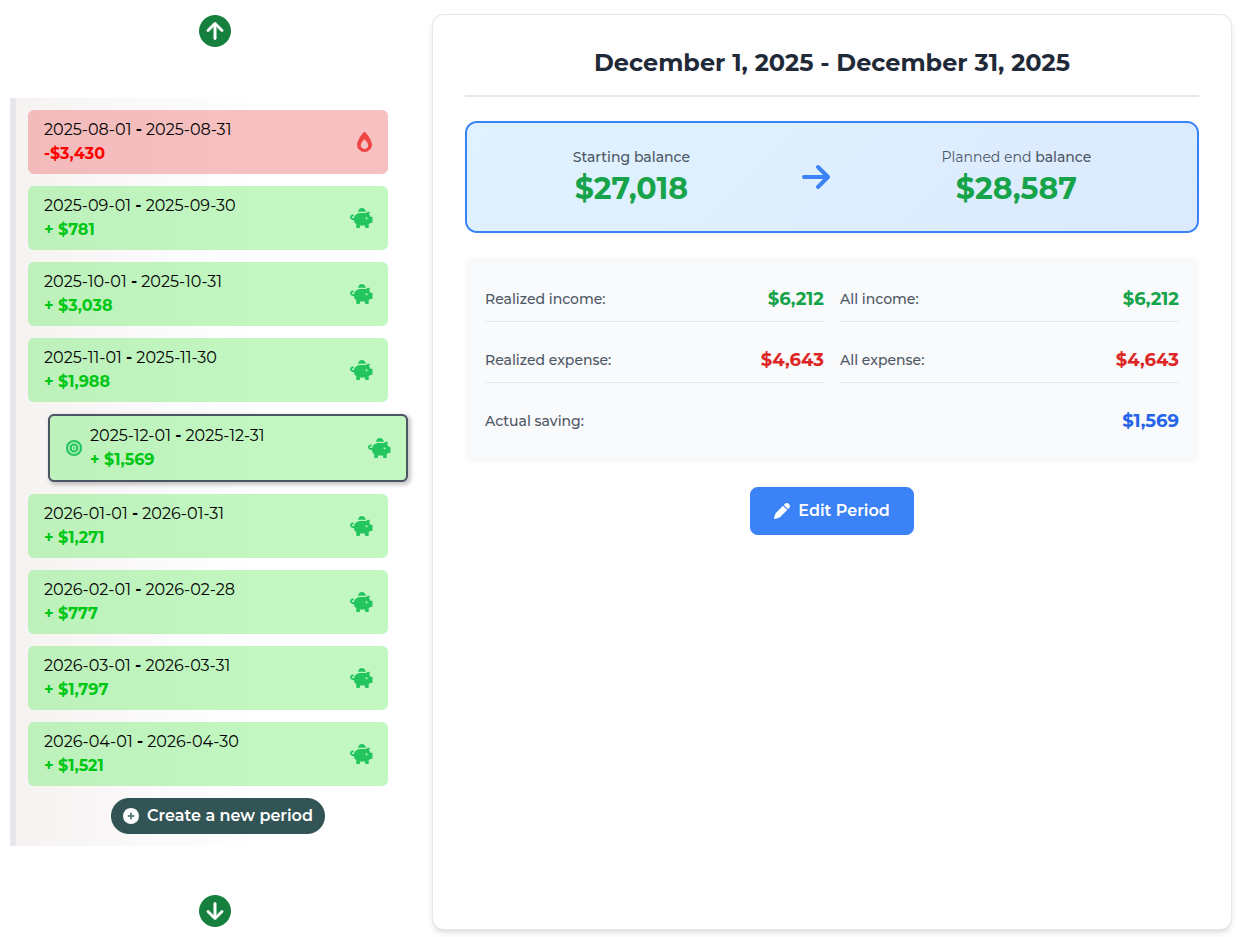
A period is a time frame for your budget - typically one month. Each period has:
- Start and end dates
- Groups (expense and income categories)
- Transactions
- Budget calculations
Why Period-Based Budgeting Works
🎯 Clear Goals
Set specific targets for each period and measure success.
📊 Track Progress
Compare periods to see spending trends and improvements.
🔮 Plan Ahead
Create future periods to budget for upcoming expenses.
💰 Fresh Start
Each period is a new opportunity to stay on budget.
Period Types
📅 Period starts at specific day of the month (Recommended)
Periods start on the same day each month - set it to your payday. Most common and easiest to manage.
🔧 Periods have a day range
Set a fixed number of days for each period (e.g., every 30 days). Good for non-monthly income.
∞ Single infinite period
Tick "Create with a single infinite period" when you create the card. One continuous period with no end date - simple, but you lose the period-over-period comparisons.
Creating New Periods
Hooldbudget automatically creates your first period. To create future periods:
- Go to Periods page
- Click "New period"
- Period dates are automatically calculated based on your settings
- Groups are copied from the previous period
- Repeating transactions are automatically created
The Periods page shows your periods two ways. Timeline lists them in order with the balance change of each one; Calendar lays them out across the months so you can see where the boundaries fall. Selecting a period opens its details: starting and planned end balance, income and expense totals with what is still upcoming, actual saving, average daily spend, days left, and a breakdown of realized versus planned money per group. Select multiple lets you delete several periods at once.
Closing a Period
Once a period is over you can close it. Closing writes the period off as final and protects it from accidental edits - a closed period rejects new transactions and group changes until you reopen it.
- A period becomes closable the day after its end date
- Closed periods are marked with a Closed badge in the timeline
- You get a closing report summarising how the period actually went
- Hooldbudget reminds you when a period has been sitting unclosed
- Reopen a closed period any time if you need to correct something
💡 Tip: Create 1-2 periods ahead to plan future expenses and see your projected balance.
Setting Budgets
In the Planning page, you can set budget amounts for each expense group:
How to set budgets:
- Go to Planning page
- Click on a group to expand it
- Enter budget amount in the "Budget" field
- Click "Save"

Understanding Calculated Amounts
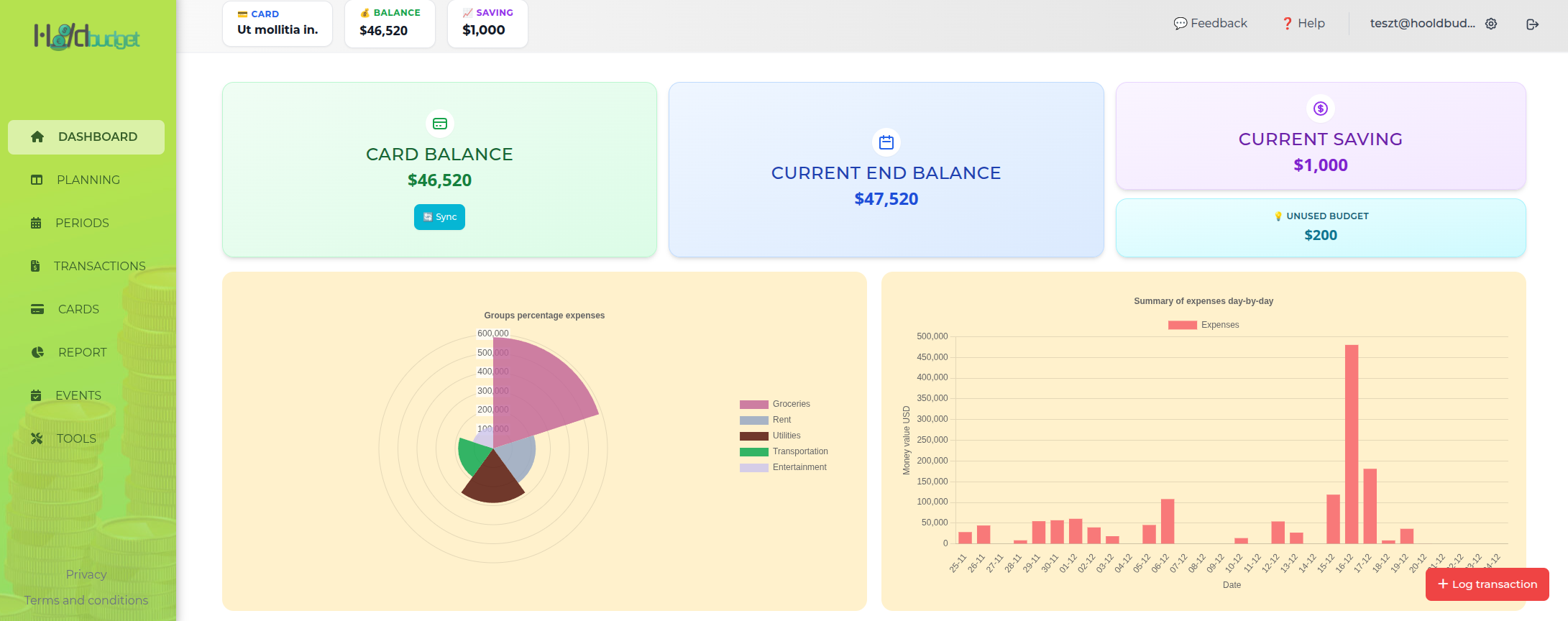
💵 Card balance
Your actual money on this card right now, after all realized transactions.
📊 Current end balance
Projected balance at the end of this period, based on budgets and transactions that are still to come.
💰 Current saving
What this period has put aside so far - income received minus money already spent.
💡 Unused budget
Budgeted money you have not spent yet. It is still reserved, so treat it as spoken for rather than free.
Modifying Period Dates
Need to adjust when a period starts or ends? You can modify dates anytime:
⚠️ Warning: Changing period dates may move transactions to different periods. Review carefully before saving.
Best Practices
- ✓ Align with payday: Start periods on or after your payday for easier budgeting
- ✓ Plan 1-2 periods ahead: See future expenses and adjust spending now
- ✓ Review at period end: Compare budget vs actual spending
- ✓ Adjust budgets: Update amounts based on reality, not wishful thinking
Start Planning Your Budget
Create future periods and set budgets to take control of your finances.
Go to PlanningNext Guide:
Groups & Categories Guide